
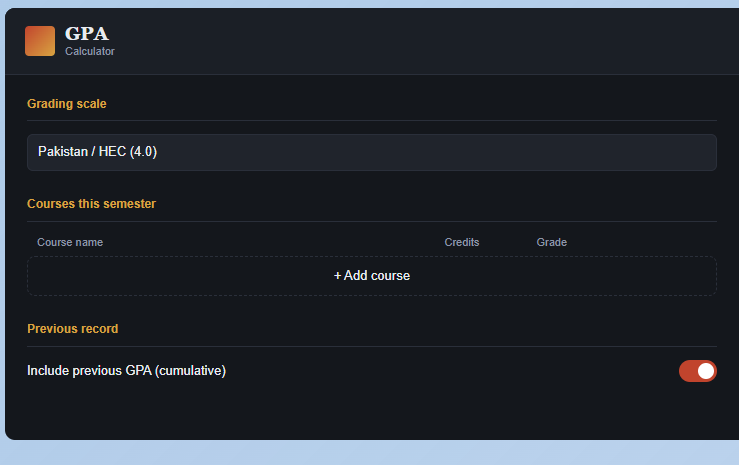
Grading scale
Courses this semester
Previous record
GPA Calculator: How It Works and 5 Ways It Saves You Time
Every semester ends the same way. Results come out, you open the grade sheet, and someone asks, “So what’s your GPA?” You grab a pen, start multiplying grades by credit hours, and halfway through you’re not sure if you carried the right number.
If that sounds familiar, a GPA calculator was made for you. In this article, we’ll look at what a GPA calculator actually does, how the math works behind the scenes, and why it’s one of the simplest tools a student can use to save time and avoid silly mistakes.
What Is a GPA Calculator?
A GPA calculator is an online tool that works out your Grade Point Average from your course grades and credit hours. You enter each course, pick the grade you got, and the tool gives you your GPA instantly.
Your GPA is a single number, usually on a 4.0 scale, that shows your overall academic performance (see the overview of the grade point average system on Wikipedia for how it varies around the world). Universities use it for scholarships, honors lists, transfers, and admissions. Employers sometimes ask for it too. So it’s a number worth getting right.
How Does a GPA Calculator Work?
The idea is simple. Not every course counts equally. A 4-credit course affects your GPA more than a 2-credit course, so the calculator gives each course a weight based on its credit hours.
Here are the steps it follows:
- Convert each letter grade into grade points. On a common 4.0 scale, an A is 4.0, a B is 3.0, and a C is 2.0. Plus and minus grades sit in between, like B+ at 3.33 or A- at 3.67.
- Multiply grade points by credit hours. The result is called quality points.
- Add up all quality points.
- Divide by the total credit hours.
That’s it. The formula looks like this:
GPA = Total Quality Points ÷ Total Credit Hours
A Real Example
Let’s say your semester looks like this:
| Course | Credits | Grade | Grade Points | Quality Points |
|---|---|---|---|---|
| Calculus | 3 | A | 4.00 | 12.00 |
| Physics | 4 | B+ | 3.33 | 13.32 |
| English | 2 | A- | 3.67 | 7.34 |
| Programming | 3 | B | 3.00 | 9.00 |
Total quality points: 41.66
Total credits: 12
GPA = 41.66 ÷ 12 = 3.47
Doing this by hand takes a few minutes. A calculator does it the moment you pick your last grade. You can try it yourself with our free GPA calculator.
What About Cumulative GPA?
Your semester GPA covers one term. Your cumulative GPA (CGPA) covers everything you’ve done so far.
To calculate it, you need your previous GPA and the credit hours you’ve already completed. The calculator turns your old GPA back into quality points, adds the new semester’s points, and divides by the new total credits.
For example, if you had a 3.20 GPA over 60 credits and then earned 41.66 quality points across 12 credits:
- Old quality points: 3.20 × 60 = 192
- New total: 192 + 41.66 = 233.66
- Total credits: 72
- New CGPA = 233.66 ÷ 72 = 3.25
This is the part most people find confusing by hand, and it’s exactly where a calculator helps the most. If you want a tool built just for this, use our CGPA calculator.
How a GPA Calculator Saves Your Time
1. No more repeated math
Manual calculation means multiplying, adding, and dividing for every course. With six or seven courses, that’s a lot of steps. A calculator does all of it in a blink, and it updates live when you change a grade.
2. Fewer mistakes
One wrong multiplication or a forgotten course can shift your GPA noticeably. Calculators don’t get tired or distracted, so the result stays accurate.
3. Quick “what if” planning
This is the feature students love most. Want to know what GPA you’d get if you score a B+ instead of a B in your hardest course? Just change the grade and see. You can plan your final exams with real numbers instead of guesses. Our target GPA calculator is built for exactly this.
4. Easy cumulative tracking
Instead of digging through old transcripts, you enter your current GPA and completed credits, and the tool does the rest.
5. Support for different grading scales
Not every university uses the same system. Some use a strict A to F scale, some use plus and minus grades, and universities in Pakistan following Higher Education Commission (HEC) guidelines use values like 3.67 and 3.33. A good calculator lets you switch scales so the result matches your institution. If you need to convert your result, try our GPA to percentage converter.
Common GPA Mistakes a Calculator Helps You Avoid
- Ignoring credit hours. Averaging your grades without weighting them gives the wrong answer.
- Using the wrong scale. A 3.7 for A- and a 3.67 for A- lead to slightly different results. Always match your university’s scale.
- Rounding too early. Round only at the very end, not after every course.
- Counting courses that shouldn’t count. Pass/fail courses and withdrawals are handled differently by different universities, so check your policy.
Who Should Use a GPA Calculator?
Almost every student can benefit:
- School and college students checking their semester results
- University students tracking CGPA across several terms
- Scholarship applicants who need to know if they meet a minimum GPA (the College Board scholarship resources are a good place to see typical requirements)
- Students planning ahead who want to set realistic grade targets
- Parents and teachers helping students understand their progress
Tips for Getting the Most Out of It
- Keep your official grade sheet next to you and copy grades exactly.
- Check your university’s grading scale before you start.
- Use the calculator before exams to set clear targets, not just after results.
- Treat the result as an estimate. Your university’s official transcript is always the final word.
For more study help, browse our student resources section.
Frequently Asked Questions
Is a GPA calculator accurate?
Yes, as long as you enter the right grades and credit hours and choose the correct grading scale. The math is straightforward, so accuracy mostly depends on your inputs.
What is a good GPA?
It depends on your goals and university. In general, 3.0 is considered good, and 3.5 or above is strong. Many scholarships and honors programs ask for 3.5 or higher.
Can I calculate my GPA without a calculator?
Absolutely. Use the formula above. A calculator just does the same thing faster and with fewer errors.
What is the difference between GPA and CGPA?
GPA usually refers to one semester. CGPA is your overall average across all completed semesters.
Can a GPA calculator predict my future GPA?
It can’t predict, but it can show you what your GPA would be under different grade outcomes, which is great for planning.
Final Thoughts
Calculating GPA by hand isn’t hard, but it’s slow, repetitive, and easy to get wrong. A GPA calculator removes all that friction. You enter your courses, get your number in seconds, and spend your time on what actually improves it: studying.
Try it after your next result, or even before your next exam. Seeing your target GPA in black and white can be surprisingly motivating.

One Comment